ASC — Reason for Visit
Note
The following describes an opt-in feature for practices that have ambulatory surgery centers (ASCs). To enable this feature for your organization, contact your CSM. For more information, see ASC Setup: Enable ASC Features.
In addition to adding a Reason for Visit on the day of the surgical procedure, you can also add a Reason for Visit during the Pre-Admission stage of the surgical case workflow.
Add a Reason for Visit during pre-admission
Click the add icon  next to Reason For Visit.
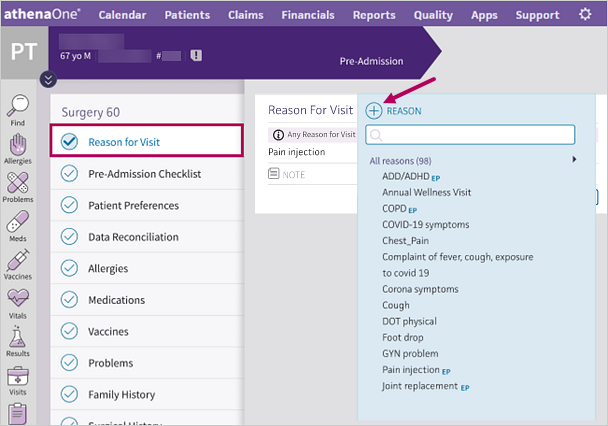
Nurses can add the Pre-Admission Reason for Visit when calling patients to prepare them for their upcoming procedure.
The Reason for Visit you enter during Pre-Admission will appear throughout the rest of the surgical case (in the Pre, Intra, Post, etc. stages) and populate the procedure templates until the day of the surgery.
Note
You can view an alert within the Reason For Visit section, stating, "Any Reason for Visit changes will be applied to the Surgical Case until the day of the procedure."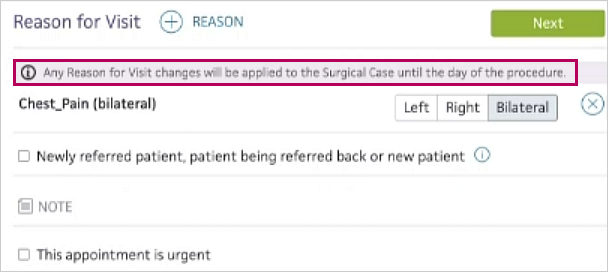
Add a new Reason for Visit the day of the procedure
On the day of the procedure, if the Reason for Visit entered during Pre-Admission isn't sufficient, you can swap out the Reason for Visit or add an additional Reason for Visit during the Pre stage of the surgical case workflow.
| If the Reason for Visit entered during Pre-Admission is... | Then on the day of the procedure in the Pre surgical stage... |
|---|---|
| Sufficient |
|
| Insufficient |
|
The original Reason for Visit recorded in Pre-Admission remains in the Pre-Admission Summary and Full Case Summary for documentation purposes. While you can amend Pre-Admission documentation, you cannot edit the Reason for Visit that was recorded during Pre-Admission.
Note
Another alert appears in the Pre surgical stage's Reason For Visit section, stating, "Reason for Visit changes made in Pre-Procedure will not be applied to Pre-admission."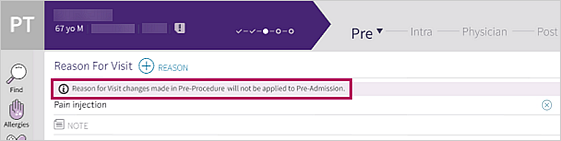
Chief Complaint
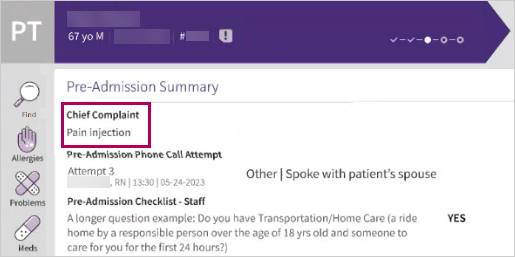
In the Pre-Admission Summary, the Reason for Visit appears as Chief Complaint to better align with your documentation purposes.
 Workflow Scenario
-
Alex, a nurse at Seven Hills Surgery Center, calls a patient, Bill, to prepare him for his surgery tomorrow.
-
Alex records the Reason for Visit as "Left Knee Arthroscopy" during the Pre-Admission prep phone call.
-
The Left Knee Arthroscopy Encounter Plan and its associated procedure templates populate throughout the surgical case.
-
On the day of the surgery, Colleen, a different nurse, realizes the Reason for Visit should refer to the right knee, not the left.
-
In the Pre stage of the surgical case workflow, she deletes the "Left Knee Arthroscopy" Reason for Visit and adds a new Reason for Visit for "Right Knee Arthroscopy".
-
The Right Knee Arthroscopy Encounter Plan and its associated procedure templates populate throughout the surgical case.
Note
Colleen's updates do not affect what was recorded in Pre-Admission. The Pre-Admission Summary still states the Chief Complaint as "Left Knee Arthroscopy".